Flutter
Flutter - Overlap widget without using stack
대기만성 개발자
2022. 1. 29. 01:16
반응형
위젯들을 겹쳐야되는 상황이 생길 때 대부분 stack을 먼저 떠올릴텐데
stack을 사용하지 않고도 가능한 방법이 몇가지 있습니다
그중에서 Align을 이용한 방법 그리고 무적위젯 transform을 이용한 방법을 알아보겠습니다
import 'package:flutter/material.dart';

class WidgetTest extends StatefulWidget {
  const WidgetTest({Key? key, required this.title}) : super(key: key);

  final String title;

  @override
  _WidgetTestState createState() => _WidgetTestState();
}

class _WidgetTestState extends State<WidgetTest> {
  @override
  Widget build(BuildContext context) {
    return Scaffold(
      appBar: AppBar(
        title: Text(widget.title),
      ),
      body: Column(
        children: [
          Container(color: Colors.blue, height: 100),
          Transform.translate(
            offset: const Offset(0, -20),
            child: Container(
              decoration: const BoxDecoration(
                color: Colors.grey,
                borderRadius: BorderRadius.vertical(top: Radius.circular(20)),
              ),
              alignment: Alignment.center,
              height: 100,
            ),
          ),
          SizedBox(
            height: 50,
            child: Row(
              children: [
                Expanded(
                  child: const Padding(
                    padding: EdgeInsets.symmetric(horizontal: 20),
                    child: Divider(
                      indent: 1,
                      color: Colors.black,
                    ),
                  ),
                ),
                Text('절취선'),
                Expanded(
                  child: const Padding(
                    padding: EdgeInsets.symmetric(horizontal: 20),
                    child: Divider(
                      indent: 1,
                      color: Colors.black,
                    ),
                  ),
                ),
              ],
            ),
          ),
          Container(color: Colors.blue, height: 100),
          Align(
            heightFactor: 0.5,
            child: Container(
              decoration: const BoxDecoration(
                color: Colors.grey,
                borderRadius: BorderRadius.vertical(top: Radius.circular(20)),
              ),
              alignment: Alignment.center,
              height: 100,
            ),
          ),
        ],
      ),
    );
  }
}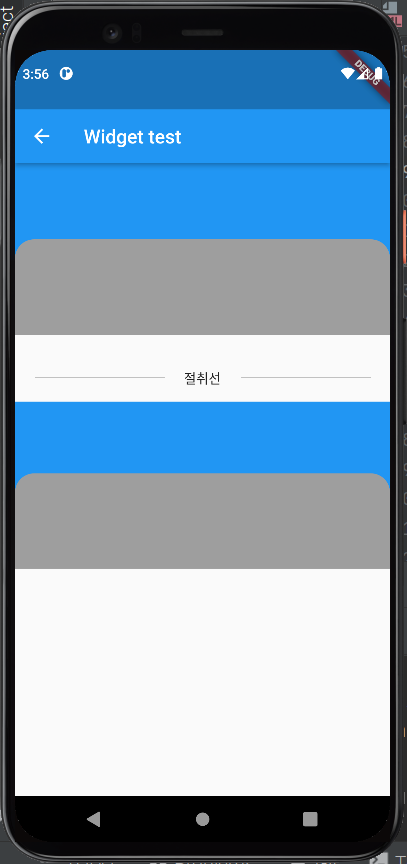
Transform은 무적의 위젯(?)이니 조금 변형시키는건 아주 간단하게 할 수 있고
Align의 width, height factor 속성은 설명 대로
If non-null, sets its height to the child's width/height multiplied by this factor
위젯의 너비와 높이를 곱해주는 역할을 해줘서 사이즈를 정해줄 수 있습니다
그런데 이 친구(?)가 위젯의 너비, 높이를 조정해주는게 아니라
차지하는 공간의 너비, 높이를 조정해주는 친구여서
height같은 경우 상단만 조정되는게 아니라 하단도 같이 조정되고
내부도 어느정도는 영향을 받아서 잘(?) 사용하셔야 됩니다
반응형